Using Claude Code:HTML 的不合理有效性 — 学习总结
Using Claude Code: The unreasonable effectiveness of HTML — 学习总结
原文: https://claude.com/blog/using-claude-code-the-unreasonable-effectiveness-of-html
作者: Thariq Shihipar (Anthropic 技术成员)
日期: 2026-05-20
核心观点: 与 Claude Code 协作时,使用 HTML 而非 Markdown 能产生出人意料的高效结果,因为它能显著提升信息表达密度、可读性和交互性。
昨天CLAUDE 团队在博客中分享出了如何使用 HTML 构建 HTML 文件,并详细介绍了 HTML 的优势。
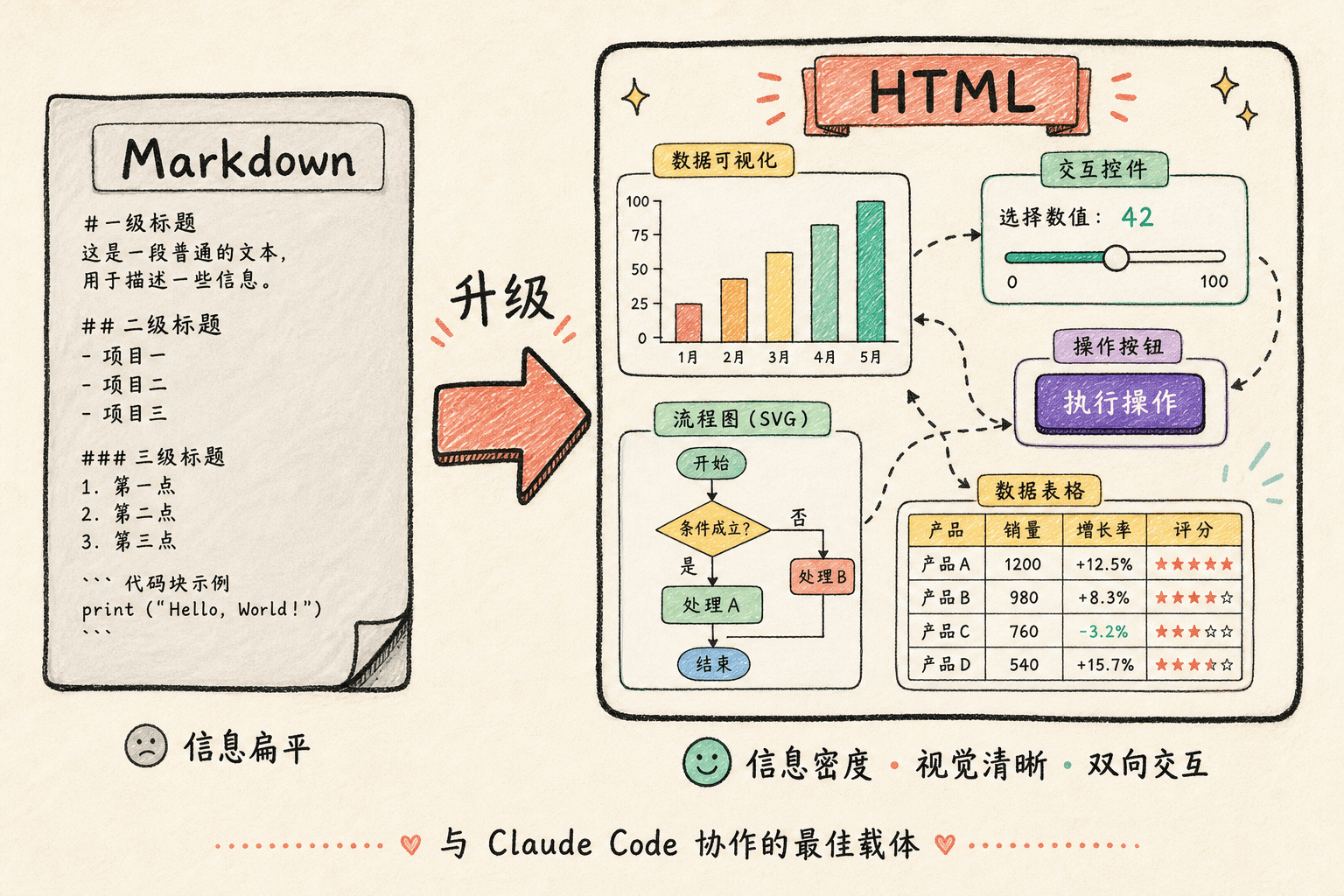
一、为什么 HTML 比 Markdown 更有效
| 维度 | HTML 的优势 |
|---|---|
| 信息密度 | 支持表格、CSS、SVG、脚本标签、Canvas、图片等,几乎能表达任何信息;避免 Markdown 中低效的做法(如 ASCII 图表、Unicode 颜色估算) |
| 视觉清晰度 | 可用标签页、插图、链接组织内容,甚至响应式布局;100+ 行的 Markdown 很难读完,HTML 则易于浏览 |
| 分享便利性 | 浏览器原生渲染,直接发链接即可;Markdown 往往需要作为附件发送 |
| 双向交互 | 可添加滑块、旋钮调整参数,实时看到变化;可一键复制修改后的内容粘贴回 Claude Code |
| 数据摄入 | Claude Code 能读取代码库、MCP(Slack/Linear 等)、浏览器、git 历史,生成丰富的 HTML 报告 |
二、五大核心使用场景
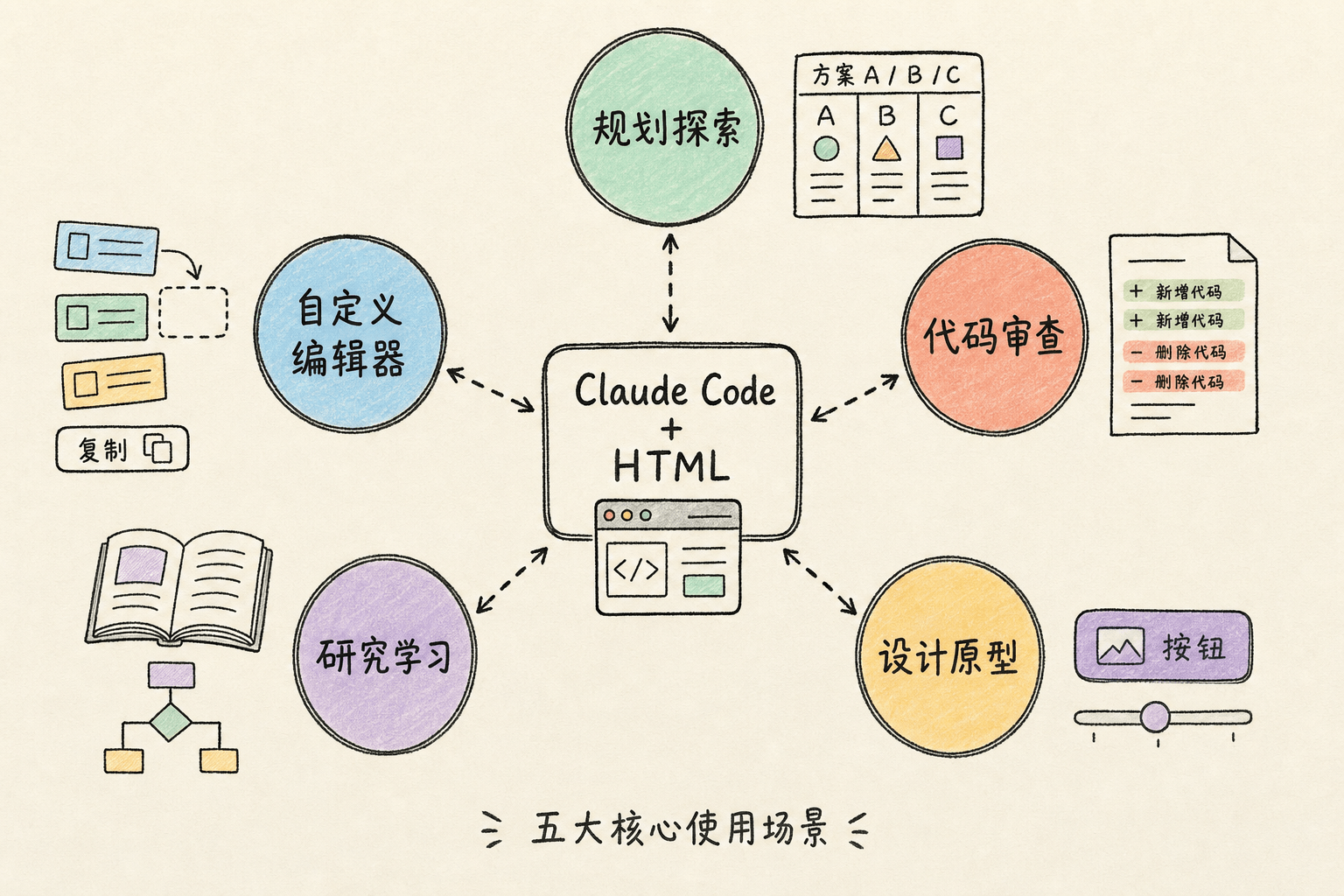
1. 规格、规划与探索
让 Claude 生成多种方案并在一个 HTML 中用网格并排对比;创建带模拟图、数据流图和代码片段的实施计划。
示例 Prompt:
“I’m not sure what direction to take the onboarding screen. Generate 6 distinctly different approaches—vary layout, tone, and density—and lay them out as a single HTML file in a grid so I can compare them side by side. Label each with the tradeoff it’s making.”
适用场景:
- 探索代码的不同实现方式
- 同时实验多种视觉设计
2. 代码审查与理解
渲染 diff、注释、流程图和模块图;帮助理解复杂逻辑(如流控制/背压)。
示例 Prompt:
“Help me review this PR by creating an HTML artifact that describes it. I’m not very familiar with the streaming/backpressure logic, so focus on that. Render the actual diff with inline margin annotations, color-code findings by severity…”
适用场景:
- 创建 PR 说明
- 审查 PR
- 理解代码中的某个主题
3. 设计与原型
快速草拟设计,再转写成 React/Swift 等目标语言;用滑块调整动画参数,找到理想效果后一键复制参数。
示例 Prompt:
“I want to prototype a new checkout button, when clicked it does a play animation and then turns purple quickly. Create a HTML file with several sliders and options for me to try different options on this animation, give me a copy button to copy the parameters that worked well.”
适用场景:
- 创建设计系统产物
- 调整组件
- 可视化组件库
- 原型动画
4. 报告、研究与学习
跨多个数据源(Slack、代码库、git 历史、互联网)合成信息;生成交互式解释器或幻灯片,用 SVG 绘制技术图表。
示例 Prompt:
“I don’t understand how our rate limiter actually works. Read the relevant code and produce a single HTML explainer page: a diagram of the token-bucket flow, the 3–4 key code snippets annotated, and a ‘gotchas’ section at the bottom. Optimize it for someone reading it once.”
适用场景:
- 撰写功能总结
- 生成解释文档
- 起草周报
- 创建事故报告
- 生成 SVG 插图、流程图和技术图表
5. 自定义编辑界面(最强技巧)
为特定任务构建一次性 HTML 编辑器(非产品,非可复用工具)。
关键规则: 始终以一个 “导出”按钮 结尾 —— “Copy as JSON” 或 “Copy as prompt”。
示例 Prompts:
- “I need to reprioritize these 30 Linear tickets. Make me an HTML file with each ticket as a draggable card across Now / Next / Later / Cut columns. Pre-sort them by your best guess. Add a ‘copy as Markdown’ button that exports the final ordering…”
- “Here’s our feature flag config. Build a form-based editor for it, group flags by area, show dependencies between them, warn me if I enable a flag whose prerequisite is off. Add a ‘copy diff’ button…”
- “I’m tuning this system prompt. Make a side-by-side editor: editable prompt on the left with the variable slots highlighted, three sample inputs on the right that re-render the filled template live. Add a character/token counter and a copy button.”
适用场景:
- 重新排序、分类或分桶任何事物(工单、测试用例、反馈)
- 编辑结构化配置(Feature Flags、环境变量、带约束的 JSON/YAML)
- 调优提示词、模板或文案(带实时预览)
- 策划数据集 —— 批准/拒绝行、标记示例、导出选择
- 标注文档、转录稿或 diff 并导出注释
- 选择难以用文字表达的数值:颜色、缓动曲线、裁剪区域、cron 表达式、正则表达式
三、常见问题
| 问题 | 回答 |
|---|---|
| HTML 不是更耗 token 吗? | 虽然 token 更多,但 Opus 4.7 有 1M 上下文窗口,且表达力增强和实际阅读率提升带来的收益远超成本 |
| 什么时候还用 Markdown? | 作者自认是”HTML 最大化主义者”,几乎完全不用 Markdown 了 |
| 如何开始? | 只需在 prompt 中说 “make an HTML file” 或 “make an HTML artifact”;复杂场景可逐步构建 skill |
| 这是如何取代规划的? | 不是单一计划,而是多个 HTML 文件对应规划的不同阶段/部分;这些文件会保留作为未来参考和验证依据 |
四、核心洞察

使用 HTML 的真正原因不是技术层面的效率,而是帮助用户保持在 Claude 的决策回路中(stay in the loop)。
随着 Claude 承担越来越复杂的任务,用户容易变成”甩手掌柜”。HTML 的可视化、交互性和信息丰富度迫使用户真正阅读、理解并参与 Claude 的思考过程,而不是盲目接受输出。